


Apex Stand
Apex Articulating Dual Monitor Desk Arm for 14–32" Screens
Apex Articulating Dual Monitor Desk Arm for 14–32" Screens
SKU: AS-MNT-ARM-007
- Regular price
- Price: $39.99
- Regular price
- List Price:
- Sale price
- Price: $39.99
- Unit price
- per
Couldn't load pickup availability
- Free shipping across Canada
- 5+ years warranty
- Ships within 48 hours
Shipping
Shipping
Order Confirmation
Once your order is placed, you'll receive a confirmation email right away. We pre-authorize your card and immediately contact our suppliers to verify availability. If an item is out of stock, we void the authorization and notify you by email.
Order Shipment
In-stock orders ship within 2 business days. Tracking details are sent within 24 hours of dispatch. Haven't received tracking after 6 business days? Contact us at orders@apexstand.ca.
Damages
Inspect packaging on delivery and note any damage when signing. If your item arrives damaged, email photos to returns@apexstand.ca — we'll file an insurance claim on your behalf.
Cancellations & Refunds
Orders cancelled after 48 hours are subject to a $20 CAD admin fee. If your order has shipped, return shipping costs are the buyer's responsibility. Refunds go to the original payment method only.
Price Match
Price Match
Found a lower price within 6 months of your purchase? We'll refund the difference — no questions asked. This applies to price drops on our own site too.
Email us a link to the same product at the lower price within 6 months of your order date and we'll process the credit to your original payment method.
Guarantee Conditions
- Item must be purchased on apexstand.ca first
- Promotions, rebates & BOGO deals are excluded
- Item must be in stock on the competitor's site
- Competitor must be an authorized online retailer
- Auction or discount sites (eBay, Overstock…) excluded
- Covers item price + shipping — excludes sales tax


Description
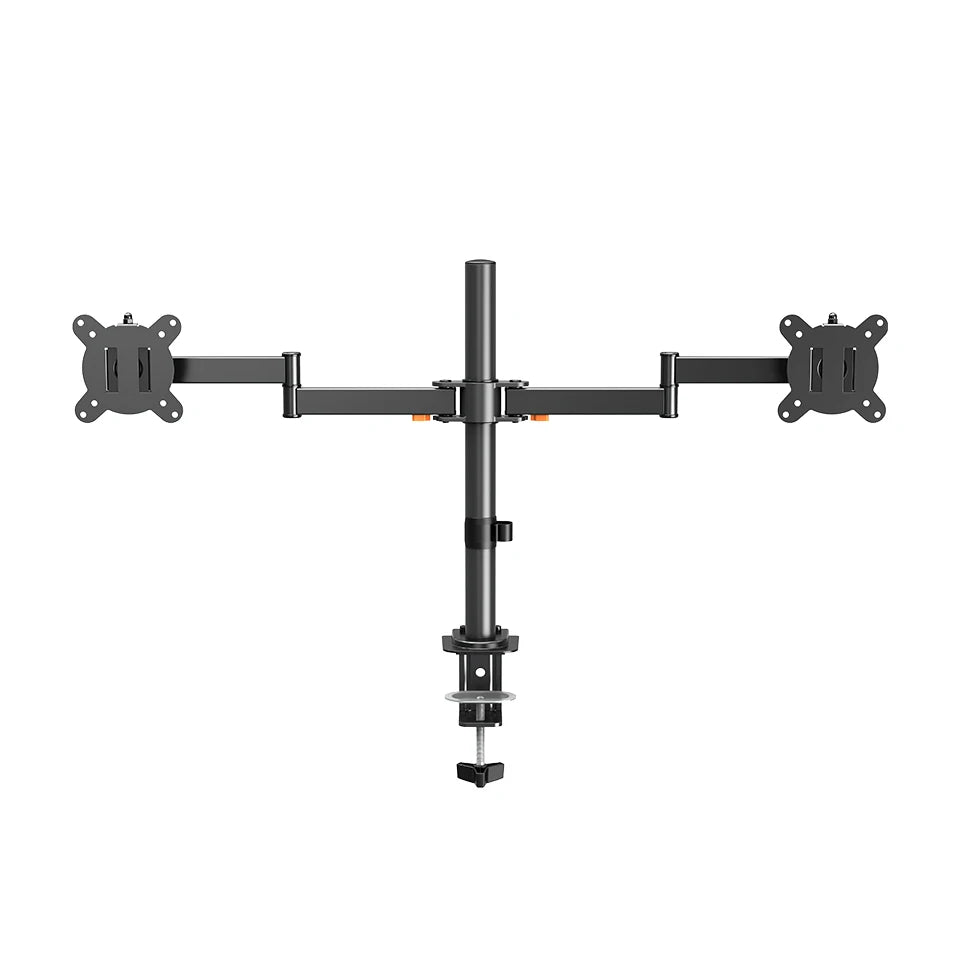
This articulating dual monitor desk arm is built to support two screens simultaneously, freeing up desk space while providing smooth, independent adjustment for each display. Constructed from durable metal with a sleek black finish, it accommodates monitors from 14 to 32 inches and offers full range of motion for optimal viewing angles. Ideal for office workstations, home offices, and multi-monitor setups, it helps reduce neck strain and maximize productivity.
Key Features
- Dual Independent Arms: Each arm adjusts separately for personalized positioning of two monitors side by side.
- Wide Screen Compatibility: Supports 14–32 inch displays with standard VESA mounting patterns.
- Full Motion Range: -45° to +90° tilt, ±90° swivel, and 360° rotation per monitor for flexible viewing.
- 2–8 kg Capacity Per Arm: Securely holds monitors weighing 4.4–17.6 lbs each without sagging.
- Desk Clamp/Grommet Mount: Stable installation options preserve desktop space and ensure rock-solid positioning.
- Clean Cable Management: Integrated channels keep cords organized along the arms for a professional look.
Specifications
- Type: Articulating dual monitor desk arm mount
- Maximum Compatible Size: 32 inches
- Materials: Metal
- Color: Black
- VESA Compatibility: 75 × 75 mm, 100 × 100 mm
- Loading Capacity: 2–8 kg (4.4–17.6 lbs) per arm
- Tilt Range: -45° to +90°
- Swivel: ±90°
- Rotation: 360° per monitor
Frame
Control panel
Warranty information will be added soon.
Have a question?
We're here to help!
What does the warranty cover?
All Apex Stand products come with a minimum 5+ year warranty covering structural defects, mechanical failures, and material issues under normal use. Warranty is valid for the original purchaser only.
What's not covered:normal wear & tear, damage from misuse, or cosmetic damage after delivery.
To make a warranty claim, email us atsupport@apexstand.cawith your order number and photos of the issue — we'll repair or replace any defective parts.
How do I place, track, or change my order?
To place an order: Simply add your item to cart and check out directly on apexstand.ca. Need help choosing? Reach us at support@apexstand.ca or call (514) 447-7026.
To track your order: You'll receive a tracking link by email within 24 hours of your order shipping. Note: it may take up to 24 hours for movement to appear on the tracking status.
To change your order: Contact us within 48 hours of placing your order with your order number. Changes after 48 hours may incur a $20 CAD admin fee.
What is the return policy?
We accept returns within 30 days of delivery on items in their original condition and packaging. To start a return, email returns@apexstand.ca — we'll walk you through the process.
Once we receive and inspect your return, a refund is issued to your original payment method within 3–5 business days. Return shipping costs are the buyer's responsibility unless the item arrived damaged or defective.
How long does assembly take?
Assembly difficulty varies by product:
— Office Chairs: 10–20 minutes, straightforward with included instructions.
— Standing Desks: 30–45 minutes. We recommend having a second person help with the desktop. Full assembly instructions are included in the box.
— Accessories (monitor arms, desk pads, etc.): 5–15 minutes, minimal tools required.
All products include a printed instruction manual. If you need help, email us at support@apexstand.ca.
How do I reset my standing desk?
If your desk is unresponsive or behaving unexpectedly, try a full reset:
1. Unplug the desk from the wall outlet.
2. Wait 30 seconds, then plug it back in.
3. Press and hold the Down button for 10–15 seconds until the desk lowers completely and the display resets.
If the issue persists, email support@apexstand.ca with your order number and a short video of the issue — we'll troubleshoot with you directly.
When can I reach customer support?
Our team is available Monday – Friday, 9am – 5pm EST.
📧support@apexstand.ca
📞(514) 447-7026
We aim to respond to all emails within 1 business day. For urgent order issues, calling is the fastest option.
Why Shop with Apex Stand
-

Curated for Quality
Every product is hand-selected for durability, ergonomics, and design — no compromises.
-

Canadian Business
We're proudly based in Toronto, ON — serving Canadians coast to coast in CAD pricing.
-

Fast, Free Shipping
Free shipping on every order across Canada via Canada Post, FedEx & UPS.
-

Real Customer Support
Reach a real person by phone or email — before, during, and after your purchase.
-

Price Match Guarantee
Find it cheaper? We match it — up to 6 months after your purchase date.
-

5+ Year Warranty
Industry-leading warranty on all products. We stand behind everything we sell.


